Writing a book is rarely a solo endeavor. Whether you co-author with a partner, manage a team of ghostwriters, run a publishing agency, or work with editors and beta readers, WordStructor's team collaboration features give you shared project workspaces, real-time editing, granular permissions, inline comments, and full version history — all within a single desktop application designed for teams.
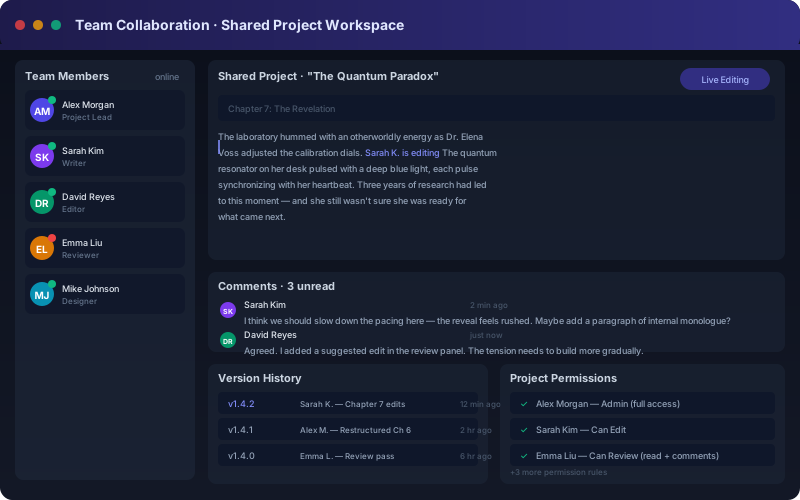
The team collaboration dashboard — live editing with Sarah Kim, inline comments from David Reyes, and full version history tracking every change.
Most writing software treats collaboration as an afterthought — a file shared over email, a Google Doc link, a Dropbox folder that quickly becomes a maze of conflicting versions. Professional book writing demands a more structured approach. When multiple people contribute to a manuscript, you need clear visibility into who changed what, when, and why. You need the ability to assign tasks, leave contextual feedback, and control who can edit versus who can only view. WordStructor's team collaboration layer was built from the ground up to address these needs, integrating seamlessly with the AI writing engine that powers individual author productivity.
Teams using WordStructor report a 70 percent reduction in version confusion and a 50 percent faster review cycle. The reason is simple: instead of asking "which file has the latest changes," every team member works in the same live project, with every edit tracked, every comment preserved, and every version saved automatically.
Every project in WordStructor can be shared with any number of team members. When you invite someone to a project, they gain access to the full manuscript, character database, plot threads, notes, and publishing settings — all in real time. No duplicate files, no sync conflicts, no confusion about which version is current.
Multiple team members can edit the same chapter at the same time. WordStructor's sync engine merges changes seamlessly, showing each person's cursor position and live edits. You can watch a co-author write a scene while you refine the dialogue — exactly like collaborative code editors but purpose-built for prose.
Not every collaborator needs the same level of access. WordStructor supports five permission levels: Owner, Admin, Editor, Reviewer, and Viewer. Owners control billing and team membership. Admins manage project settings. Editors can write and revise. Reviewers can comment but cannot edit. Viewers can read the manuscript without making changes.
Leave contextual feedback directly on any paragraph, sentence, or word. Comments are threaded — team members can reply, resolve, or reopen discussions. Reviewers can request changes without altering the text, and editors can accept or dismiss requests with one click. Every comment is timestamped and attributed.
Every change to every chapter is automatically saved and versioned. You can view the complete history of edits, see exactly what changed in each version, compare any two versions side by side, and restore a previous version at any time. Version history is preserved forever — nothing is ever permanently lost.
Assign chapters or sections to specific team members with due dates. The project dashboard shows who is working on what, which tasks are overdue, and how each team member's workload looks. Task assignments integrate with the permission system — assigning someone to a chapter automatically grants them edit access.
| Permission | Read | Comment | Edit | Manage | Admin |
|---|---|---|---|---|---|
| Viewer | ✓ | — | — | — | — |
| Reviewer | ✓ | ✓ | — | — | — |
| Editor | ✓ | ✓ | ✓ | — | — |
| Admin | ✓ | ✓ | ✓ | ✓ | — |
| Owner | ✓ | ✓ | ✓ | ✓ | ✓ |
These permission levels map naturally to real-world writing workflows. Authors own their projects and grant admin access to their publishing partners. Editors get edit access to specific chapters. Beta readers and developmental editors get reviewer access so they can leave feedback without changing the manuscript. Clients and stakeholders can be added as viewers to track progress without interfering.
WordStructor's collaboration features shine in real-world publishing workflows. Consider a typical agency scenario: a project manager creates a new book project and invites the author, a ghostwriter, an editor, and a cover designer. The ghostwriter drafts chapters using the AI writing engine. The editor leaves inline comments suggesting revisions. The author reviews changes and approves the final manuscript. The designer uploads cover concepts directly into the project assets folder. Throughout this process, version history ensures that no change is ever lost and every decision is traceable.
For co-authors, the benefits are equally compelling. Two authors can write different chapters simultaneously, see each other's progress in real time, and merge their work without the headaches of file-based collaboration. The built-in chat and comment system replaces dozens of email threads, keeping all project communication in one place alongside the manuscript.
Explore more team-oriented features on our agency writing tools page. Learn about scaling your writing business with scaling strategies. See the full feature set and compare pricing on our pricing page.
WordStructor's team collaboration features make it easy to write, review, and publish books as a team. Whether you are a co-authoring duo or a full-scale publishing agency, WordStructor gives you the tools you need to collaborate effectively. Start your 14-day free trial today.
Start Free Trial →