When you offer book writing services under your own brand, every detail matters — from the colors and typography your clients see to the domain they visit and the templates they use. WordStructor gives you complete control over the visual and functional identity of your writing platform. White-label themes, custom domains, brand kits, CSS variables, and reusable templates let you deliver a fully branded experience that looks and feels like your own product, powered by WordStructor's industry-leading AI book generation engine.
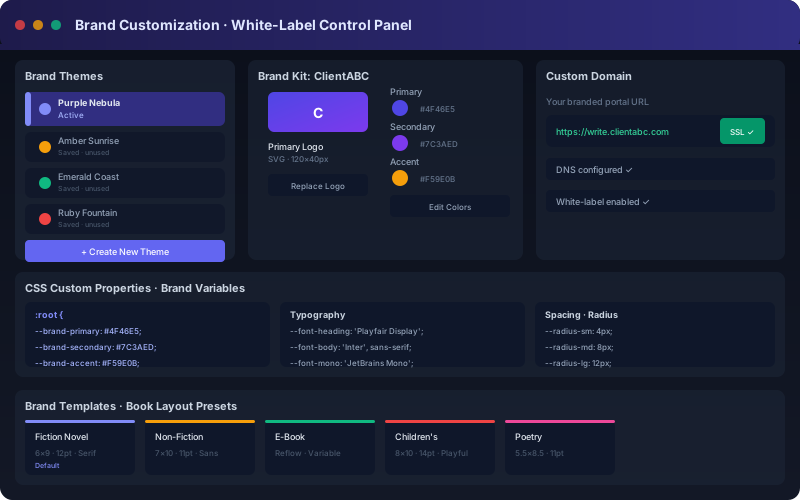
The brand customization panel — manage themes, brand kits, CSS variables, and custom domains from a single dashboard.
For writing agencies, publishing houses, and freelance author-service providers, brand identity is everything. Your clients trust your brand, not the tools you use behind the scenes. When you can present a fully customized, white-labeled writing platform under your own domain, with your colors, your logo, and your templates, you build credibility and create a seamless experience that reinforces your professional image.
WordStructor's brand customization features go beyond simple logo replacement. You can define comprehensive brand kits that control every visual aspect of the platform, create reusable templates that encode your preferred formatting and style guidelines, set up custom domains with automatic SSL, and even customize the CSS at the variable level for pixel-perfect control. This depth of customization makes WordStructor an ideal foundation for white-label SaaS offerings, as detailed in our comprehensive white-label guide.
Choose from 15 professionally designed themes or create your own from scratch. Each theme defines the complete color palette — primary, secondary, accent, background, surface, text, and border colors. Themes are applied instantly across the entire application, from the login screen to the manuscript editor to the publishing dashboard.
A brand kit bundles your logo, color palette, typography choices, icon set, and formatting preferences into a single reusable package. Create different brand kits for different clients or business lines, then apply them to projects with one click. Brand kits ensure consistency across all client-facing materials.
Host your branded WordStructor instance on your own domain. Set up a custom subdomain or use a top-level domain — for example, write.youragency.com. Automatic SSL certificate provisioning ensures secure connections. Your clients navigate to your domain, log in with your brand, and never see WordStructor branding unless you choose to include it.
Define book templates that encode your preferred formatting — trim size, font choices, margins, headers, footers, chapter styles, and front/back matter. Templates can include placeholder content, style guidelines, and even AI writing prompts tailored to specific genres or client types.
For teams that need pixel-perfect control, WordStructor exposes its entire design system through CSS custom properties. Override any variable — from --brand-primary to --radius-lg to --font-heading — and your changes propagate throughout the application instantly. This is the same approach used by design systems at Vercel and GitHub.
Full white-label mode removes all WordStructor branding from the client-facing interface. Your logo appears in the header, your brand colors define the UI, your domain is in the address bar, and your support contact is in the footer. Clients believe they are using a tool you built — because in every meaningful way, you did.
:root {
  --brand-primary: #4F46E5;
  --brand-secondary: #7C3AED;
  --brand-accent: #F59E0B;
  --brand-background: #0F172A;
  --brand-surface: #1E293B;
  --brand-text: #E2E8F0;
  --brand-text-secondary: #94A3B8;
  --font-heading: 'Playfair Display', serif;
  --font-body: 'Inter', sans-serif;
  --font-mono: 'JetBrains Mono', monospace;
  --radius-sm: 4px;
  --radius-md: 8px;
  --radius-lg: 12px;
  --shadow-sm: 0 1px 2px rgba(0,0,0,0.3);
  --shadow-md: 0 4px 6px rgba(0,0,0,0.4);
  --shadow-lg: 0 10px 15px rgba(0,0,0,0.5);
}
All CSS variables are documented in the developer documentation. You can override any subset — define just the colors and inherit sensible defaults for the rest. Changes take effect immediately without reloading the application.
Many agencies serve multiple client segments — fiction authors, business writers, academic researchers — each requiring a different brand positioning. WordStructor's brand customization supports running multiple branded instances simultaneously, each with its own theme, domain, and brand kit. Our multi-brand strategy guide walks through positioning techniques and operational considerations for agencies managing 2 to 20+ brand instances.
Learn about our complete feature set. See pricing and plans on the pricing page. Read the white-label guide for step-by-step setup instructions.
Complete brand customization transforms WordStructor into your own white-labeled book writing platform. With themes, brand kits, custom domains, and CSS variable control, you can deliver a fully branded experience to your clients. Start your 14-day free trial and customize every pixel.
Start Free Trial →